

















Windows Updates Downloader (WUD) is a small Windows application that allows you to download all of the latest Windows Updates for your Windows including Windows XP, Windows Vista, Windows 2003 Pro, Windows 2000 Server and also Microsoft Office 2003, just using a simple interface.
After installation, just before you can proceed to download the updates, you have to first download the right Update Lists (ULs) for the version of your Windows. All the updates are contained in ULs. After download, open the ULs with WUD.
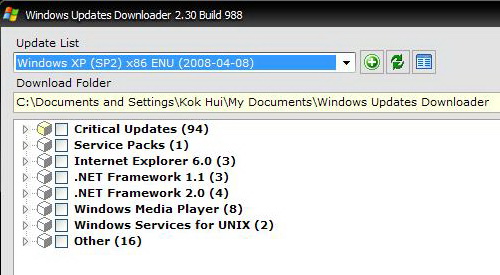
Windows Updates Downloader
Once done, you can choose the updates that you prefer to download and specify the folder to place your entire download. The updates don’t install by itself. Therefore, you need to manually install them. Just go to the download folder where you have specified it earlier and install them. Other than installing the updates, you can integrate them to an existing Windows source using tool like nLite, use them for network installations or on computer with no internet connection.