











PDF SpeedUp is a lightweight freeware Windows application that allows you to significantly speed up the startup time of the Adobe Reader software application, by disabling several unwanted or unnecessary features in Adobe Reader.
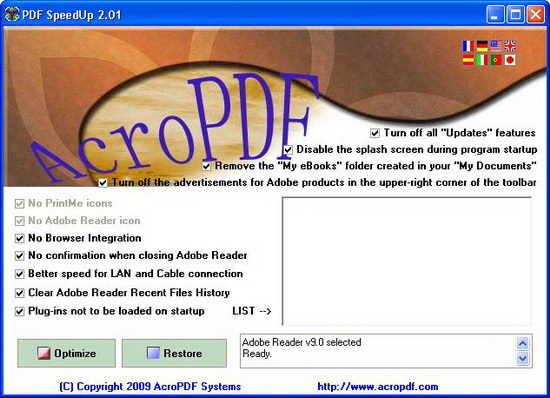
PDF SpeedUp has a straightforward interface. All the options are ticked by default in the main window. The available options are :
- Enable or disable the plug-ins as needed
- Turn off all Updates features
- Disable the splash screen during program startup
- Remove the My eBooks folder created in My Documents
- Turn off the advertisements for Adobe products in the upper-right corner of the toolbar
- Remove PrintMe and Adobe Reader icons
- Disable Browser Integration
- Disable confirmation dialog when closing Adobe Reader
- Better speed for LAN and Cable connection
- Clear Adobe Reader Recent Files History
To apply the changes, simply click on the “Optimize” button. You can restore to original settings at any time by clicking the “Restore” button from the main window.
This free PDF tweak utility requires no installation and it supports Adobe Acrobat from version 5 to 9 and Adobe Reader also from version 5 to 9. Thanks, Madhur!